Kibs Yahya

Web – Interface designer

Kampala, UG · He / him

available — Q2 2026

  • Shelf

  • Currently watching — Yeralti, Underground

    Listening — Apass, Axion –– Easay

    Cooking — Anything with preserved lemon

Reach out

replies within a day

Kibs Yahya

Dither Lab

Dither Lab

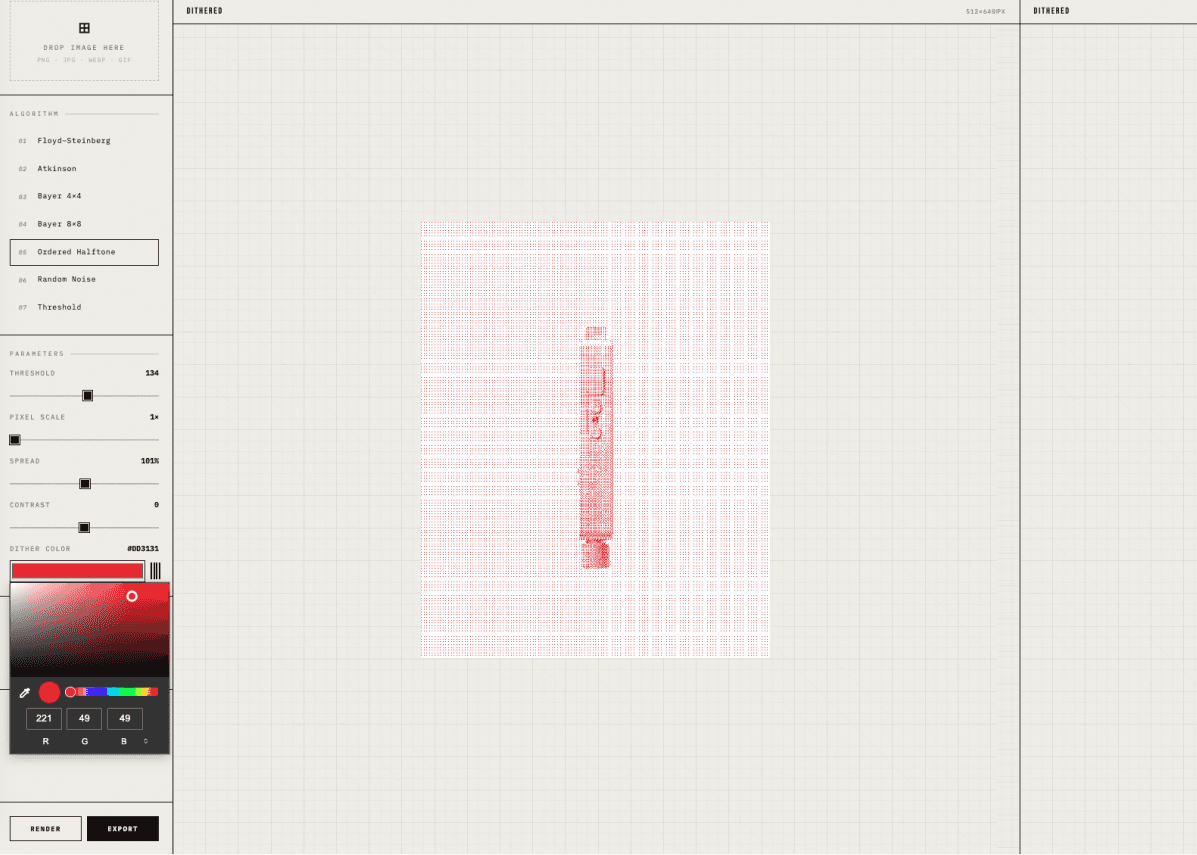
A custom dither image generator tool built with figma make

role

Design, Build

year

tags

Tool, Figma

the brief

Creating consistent dither style visuals is such a pain. I got this idea as a result of a template I was designing which required dither style visuals. I decided to spend the first day creating this tool, speficying the styling I wanted (outline, mechanical style UI for the tool), choosing the name (dither-lab) and prompting Figma make to create a live prototype.

What I shipped

  • Create a live working dither tool with various dither modes, supporting various modes like atikson, bayer and more.

  • Customization controls like color, spacing, spread, contrast to create custom visuals with total control.

  • Accessible web version published on figma for anyone to access and use in the web.

  • Added default previews that change on each load for users to visualize effects on various images without having to upload.

Example prompts used

"When I upload the image, it doesnt show up, can you fix that, also, lets have a default placeholder image that switches up to different ones on a new load, this is to give users context of the tool before even adding there images, lets focus on product related visuals, ie a casset tape, oldschool imac, the keychron aesthetic keyboard etc"

What I would improve

Creating custom tools is sometimes the best choice to have total control over the looks, features needed and who knows, saving you from paying for things you can create yourself.